 OpenStreetMap


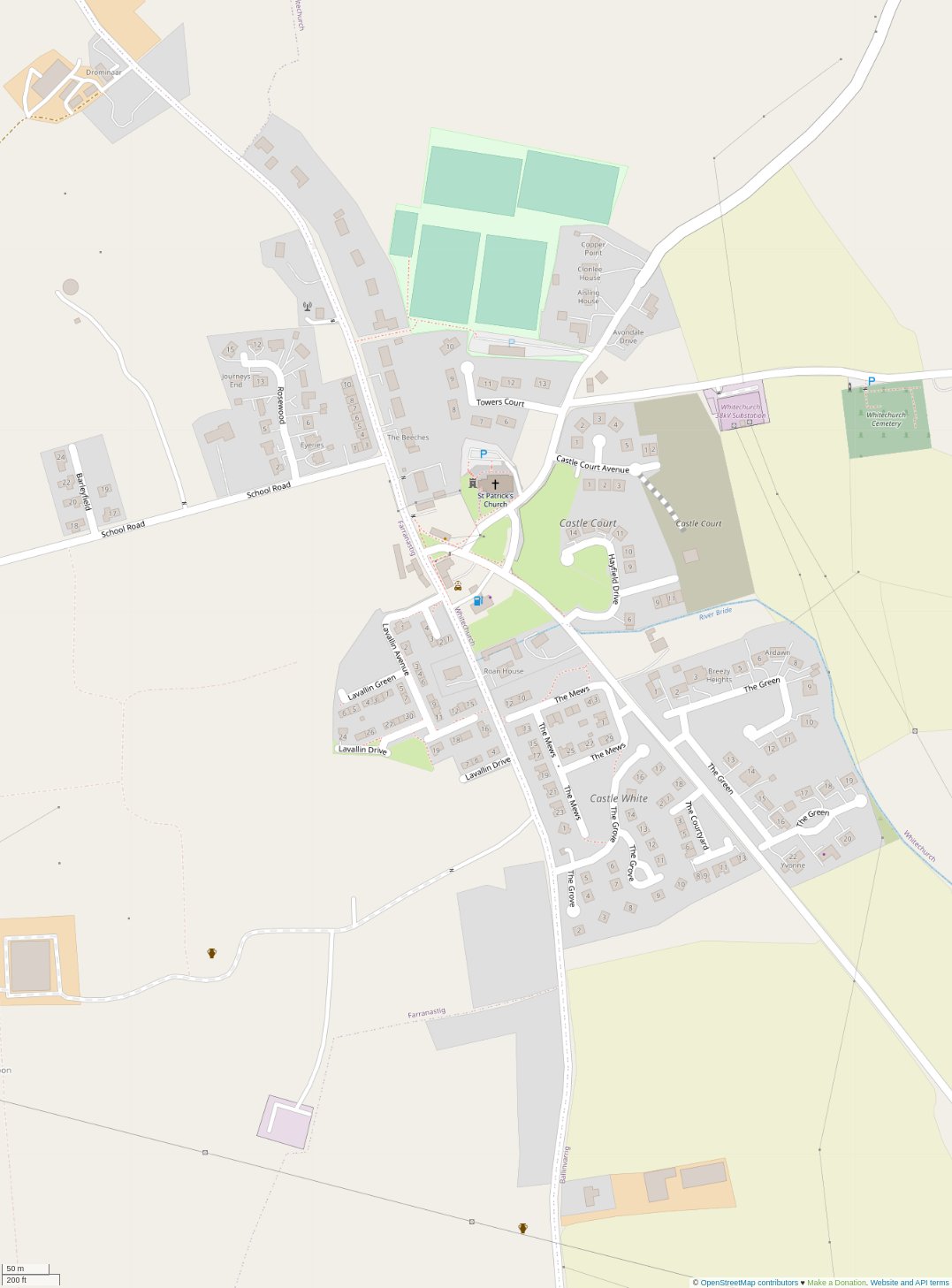

Yesterday, I finally found some time to complete some surveying in my local village.
My plan was as follows:
- Prepare for survey of house names and numbers
- Complete a survey of the village to capture notes
- Add relevant data to the map.
Preparation
I’ve been aware of the excellent Field Papers project for some time but despite some earlier plans, I hadn’t managed to complete the complete flow. For those that aren’t familiar with the software tool, it allows you to print paper maps, capture notes and then scan and bring the data into your favourite editor for further processing.
For this effort, I choose a 3x2 (HxW) A4 format (six sheets) that covered the core of the village while ensuring the various estates were mostly on the same page (link). I also created a 1-page atlas for Barleyfield (link) which was just a little bit too far west.
Surveying
Normally for these types of efforts I would hop on a bicycle and survey with zero emissions but today I had our youngest with us so I opted for the car. I worked through the area methodically capturing house numbers, street names and other useful data (e.g. house outlines of terraced buildings, etc).
I did discover that many of the housing estates in Whitechurch are a work in progress! Most are half built or are missing houses. The initial layouts are there with lots of potential for infill development / completion of the planned estates. My searches online indicated that some of the developments have changed hands over time which probably explains the lack of progress.
Every now and then I stopped to engage residents regarding bits of information that were not visible (houses with missing numbers, street names). No raised eyebrows but I suspect longer conversations would have been had if I was on foot or bicycle.
The survey took about an hour to complete despite all the little cul-de-sacs and other permeability features.
Updating the map data
Once I was back home, I scanned in my completed sheets (I have a mullti-functional printer with ADF which makes this very easy). The android app allows me to upload the files (JPGs in this case) directly to Google Drive. From there I uploaded them to the Field Papers website and waited for them to be processed. Once processed I was able to import the data as raster layers in JOSM.
Top tip: If you have multiple sheets, import all the sheets and then expand the area that you have pulled OSM vector data for.
Once in josm, I started the process of creating building outlines, adding green areas, road names, driveways and missing pedestrian only ways. This was time-consuming but taking a methodical approach worked well. I found that drawing outlines and driveway ways first and then going back and tagging in batches saved some time and effort.
Top tip: The terracing plugin is really useful for semi-detached and multi-home buildings. I found that creating a rectangle closed way, splitting it and then using the extrude tool resulted in the best results. I later discovered that the tool will also add addr:housenumber and addr:street tags if you can reliably predict the numbers. Nice!
Note: I also had to move the outline for most buildings due to the imagery used.
Validation
No editing session is complete without validating you haven’t done something silly / dangerous. I fired up the validation tools in JOSM and started working through the most obvious errors.
Errors identified:
- untagged ways. how embarrasing!
- buildings with unknown tags. this was mostly me making mistakes when adding house numbers.
- overlapping ways. this seemed to be mostly a result of the terracing tool. I’m not sure why some of the results ended up like this.
- overlapping ways and buildings. This was mostly buildings overlapping with
landuse=*areas. Small adjustments in most cases. - houses with no
addr:street=*tags. - end of a way close to another way. This happens quite a bit with driveways and in housing estates that have roads that don’t connect. I added
noexit=yestags where I felt it was appropriate. highway=*ways that had no name. The majority of these were either under-construction roads. One tertiary road has no name or ref so will have to go searching for a suitable source.
Someone along the way, my keyboard stopped working in JOSM. I’ve been getting some errors in JOSM over the past few days. Appears to be a known issue so hopefully it gets fixed soon. I was able to work around it using the mouse and menus fortunately.
Tidying up
I was ready to submit the changes. but…
NO KEYBOARD!!
How does one write a good changeset comment without a keyboard?? (hint: you don’t!).
I managed to save the session and layer I had been working on. I closed JOSM and re-opened it to find my data was all good. PHEW
Unfortunately, in the meantime there had been a small edit in the area. I walked through the conflict resolution process and fixed up the map to account for the changes.
Changeset submitted. Woo!!
A few refreshes of the map and the results were visible.
At this point I noticed a few minor errors and a few missing buildings (not in my plan but it annoyed me enough to add the building outlines).
Then is was off to bed to find one of our kids with a 38.5°C temperature. 2020 just keeps on giving!! 🤣
Lesson learnt
It was nice to find a nice block of time to do some detailed mapping. Most of my mapping is bits and pieces that I either observe on my daily travels or quality improvements based on map usage.
The effort covered:
- Lots of terracing. I feel much more comfortable using this feature now.
- Extruding lines. I had never really used this feature but had heard many mention it. Found it easy to use once I understood what it did.
- Joining overlapping areas. I had never used the feature but found it quite useful for some of the more complicated building outlines and the residential landuse areas that needed to be joined up.
- Naming of housing estates. I wasn’t really sure how this worked but the landuse=residential wiki page had good guidance and it was easy to adjust the existing
landuse=residentialareas to match the local names. - Usage of the landuse=greenfieldlanduse=brownfield
- Saving your work locally so you can resume your session later.
- Merging upstream changes into your local layers including dealing with conflicts.
metadata
Changesets: 95345380, 95352956, 95353202, 95353233
Imagery: Bing (majority of buildings), Maxar Premium (newer buildings missing from Bing)
Time taken: 1 hour (survey) + 6 hours (data processing)
Discussion
Comment from nickjohnston on 7 December 2020 at 15:12
Great work! I never tire of seeing improvements to the map like this.
Recently I discovered the JOSM Coloured Streets style. This is really useful for address mapping. I wish I’d discovered it earlier. It shows streets, buildings, and address nodes on the same street in the same colour. This makes it easy to spot buildings tagged with the wrong
addr:streetat a glance. It also clearly shows buildings withaddr:housenumberoraddr:housename(you must enable the latter in the settings) but noaddr:street. I know the JOSM validator does this check too, but with Coloured Streets you can see the problem immediately.Since I’m probably not explaining it well, this screenshot should help:
Ashcombe House, Outwoods, and Beechwood are in pink and therefore have an
addr:streetof Stanley Road, when they should be on Ashley Road. The mistake would not be obvious otherwise.As with any other JOSM style, it’s easy to toggle on and off, or to temporarily hide by switching to wireframe mode if the colours become overwhelming or distracting.
Comment from dónal on 7 December 2020 at 15:33
Thanks Nick!
It’s worth noting that the mismatched addr:street algorithm may flag false positives. In the case of the Whitechurch village case study, one of the houses has an address that differs from its primary access road. It’s obvious from the house styles and I suspect a discussion with the local community will identify a change in the development plan was the primary cause.
Comment from nickjohnston on 7 December 2020 at 16:18
It’s not really an algorithm for detecting mismatched
addr:street–it’s just a visualisation tool. Detecting the mismatches is left up to users for exactly the sort of reasons you mention: sometimes a property might appear to be on a particular road but is accessed from a different road. There are so many edge cases with addressing.Comment from ConsEbt on 9 December 2020 at 01:09
Great effort!. Can you check the image on the top. For me it is not loading but I’m really curious to see the before/after effect.
Comment from dónal on 9 December 2020 at 01:13
The images can be seen here: https://twitter.com/donalhunt/status/1335395166836973570